
Made for group trips — from first idea to last load of dishes
Plan the trip. Organize the meals. Relax.
From "where should we go?" to "who's cooking dinner?" — coordinate dates, destinations, lodging, and budgets with your group, then plan meals, assign duties, and split expenses all in one place. Built for family vacations, reunions, ski trips, and bachelorette weekends.
"This is great! I've been doing this with group chats and Excel spreadsheets for years and this is so much better!"
Join families, friend groups, and trip planners who are done coordinating by group chat.
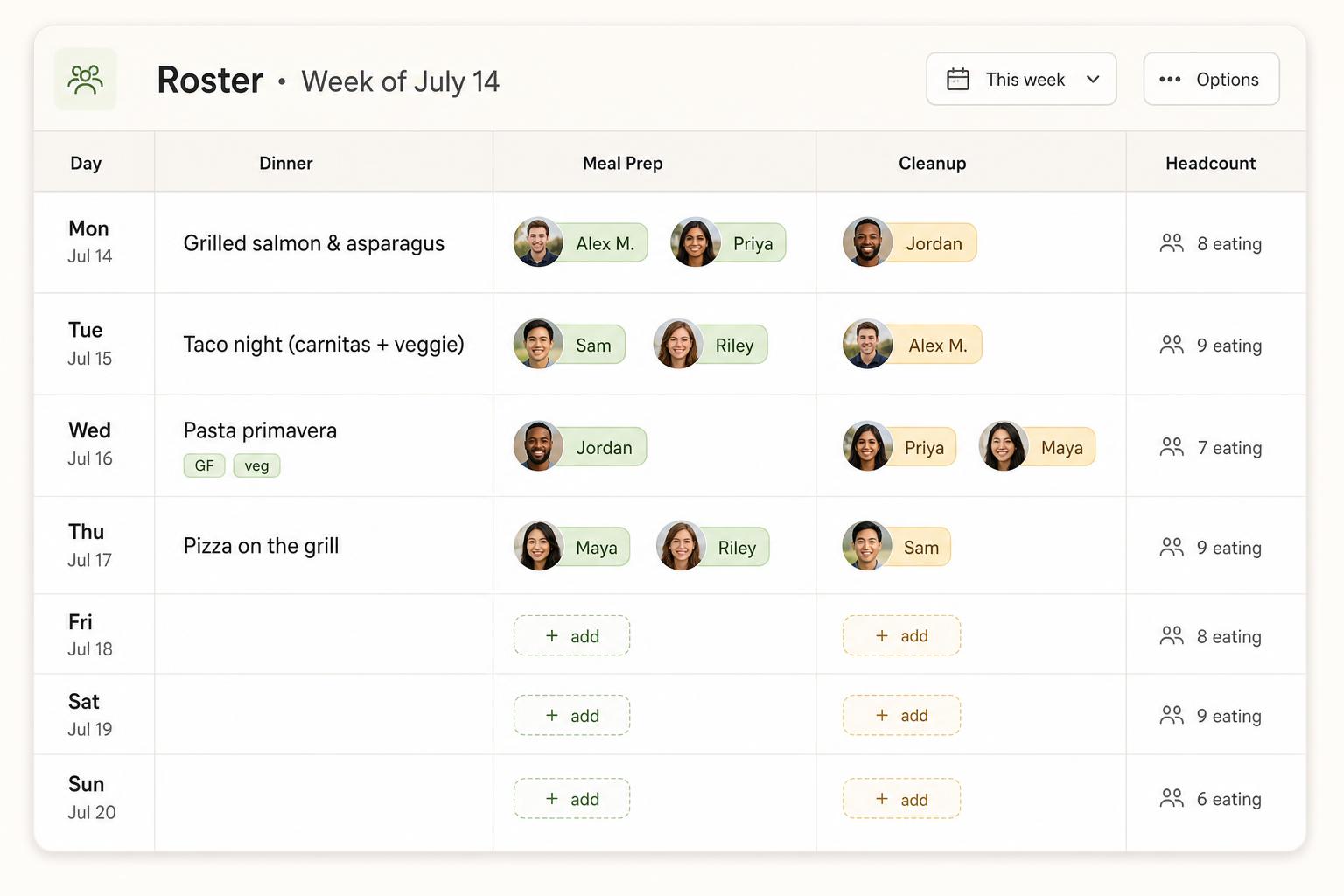
Two simple duties per meal — Meal Prep and Cleanup — assigned fairly across the group.
Two modes. Use one, the other, or both.
Plan the trip together, run the trip together — pick the mode you need. They work great on their own and even better side by side.
Planning mode
Get the group aligned
Use this on its own to land on dates, a destination, lodging, and a budget — even if you'll handle the trip itself elsewhere.
- Propose dates and let everyone vote on what works.
- Compare destinations side-by-side with the group.
- Track lodging options, links, and who's interested.
- Estimate the budget so there are no surprises later.
Trip mode
Run the week smoothly
Jump straight in if the trip is already booked — meals, duties, groceries, and shared expenses, no planning module required.
- Plan meals together — nobody shows up with duplicate chili.
- Auto-assign meal prep and cleanup so the work is fair.
- Share one grocery list that updates in real time.
- Track who paid for what and settle up with one tap.
Already booked? Skip planning. Just need to vote on dates? Skip the trip tools. Or use both and carry your group, guests, and budget through from idea to last meal.
Everything your group needs
From the first planning conversation through the last meal.
Date & destination voting
Propose options and let the group weigh in before anything is locked in.
Lodging research
Collect rental links, capacity, and price in one shared place — no more lost group chat threads.
Budget estimates
Set a target per person and see how lodging, food, and extras add up before you commit.
Meal planning board
Anyone can post what they're cooking, so no two people show up with chili.
Smart duty scheduling
Two duties per meal — Meal Prep and Cleanup — auto-filled based on who's around and who needs a turn.
Shared grocery list
Add items as you think of them. Check them off as you shop. Everyone stays in sync.
Shared expense tracking
Optional. Log who paid for groceries or dinner out, then settle up with one tap.
Allergies & diets
Tag shellfish, gluten, vegetarian, and more. Cooks see warnings on every meal.
Attendance tracking
Mark date-night absences. Headcounts update everywhere automatically.
Cook mode
A focused, screen-on view the meal prep person uses while cooking — recipe, headcount, and allergies.
Leftovers & already-have list
Track what's still in the fridge so nothing gets bought — or thrown out — twice.
Group notes & meal chat
Pin trip notes and comment on individual meals so nothing important gets buried.
Duty swaps
Got plans? Request a swap and the other person just taps to accept.
Notifications & digests
In-app bell plus optional email digests so nobody misses their cooking night.
Duplicate a trip
Going back next year? Copy meals, duties, and already-have staples in one click.
Today panel
One screen shows tonight's meal, your duties, who's around, and what to grab.
Printable schedule
Tape it to the fridge. Includes allergies, duties, headcounts, and meals.
Common questions
The quick answers most groups want — split by where you are in the trip.
Planning mode
Before you book
How do we agree on dates and a destination?
How do we keep track of lodging options?
How does the budget estimate work?
Trip mode
Once you're there
How do I start a trip?
How do I invite people to the trip?
How do guests work — can I add my whole family?
Stop coordinating by group chat. Start here.
Set up your trip in under 2 minutes — free for your whole group, no credit card needed.
Create your trip